For Mac and iPhone
The safe Mac cleaner.
iPhone storage too.
Clear caches, app leftovers, large files and developer junk on your Mac, and duplicate photos and big videos on your iPhone. Every Mac cleanup source is labelled by risk, and nothing goes without your OK.
Free scan · 2 GB of free cleaning · macOS 14+ · iOS 17+
Play demo Try Pro free for 7 days. No card needed
What it does
Everything taking up space, in one calm app.
01 / Smart Clean
One scan, every category.
Smart Clean measures system junk, developer tools, AI tools, apps and files in one pass, and labels every source by risk before you clean.
See what it clears
02 / Disk Forecast
See a full disk coming.
Disk Forecast learns how your free space changes and tells you when the disk is likely to fill up, and what is growing fastest.
How Disk Forecast works
03 / Autopilot
Scheduled cleanups you can undo.
Every day, every week or when space is low. Everything goes to the Trash first, and every run can be undone from the timeline.
Automatic Mac cleaner
04 / iPhone photos
Duplicates gone, best shot kept.
Exact copies and near-identical shots are grouped on your iPhone, the best one is marked, and favorites are never selected. Deleted photos wait in Recently Deleted for 30 days.
Duplicate photo cleaner for iPhone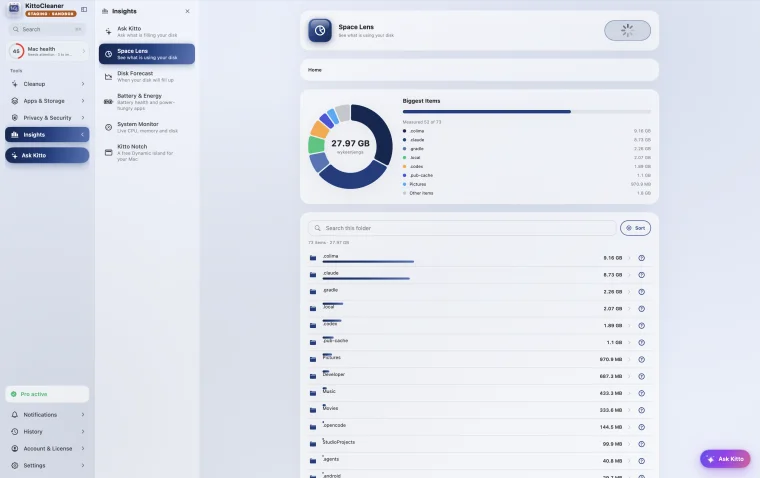
For developers
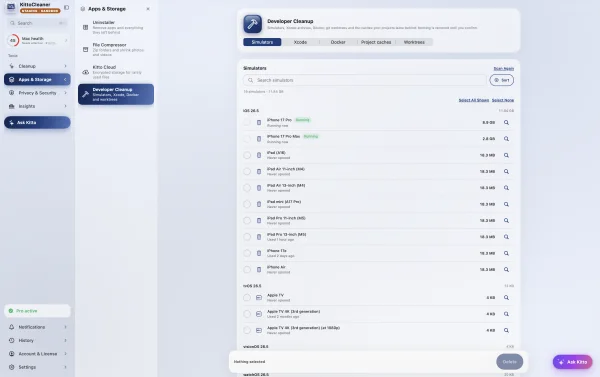
Build junk, measured and badged.
Xcode DerivedData, simulator caches and the download caches of Homebrew, npm, pip and other package managers, each with its own risk label.
Mac developer cleanupMac and iPhone
One app. Two very different jobs.
On Mac
The whole disk.
System and app caches, developer junk, app leftovers, duplicates, and large and old files.
On iPhone
The photo library.
Duplicates, similar shots, screenshots, large videos and screen recordings. iOS keeps everything else private to each app.
iPhone storage cleaner| Mac | iPhone | |
|---|---|---|
| System and app caches | 45 sources, labelled by risk | KittoCleaner's own data |
| Developer junk | Xcode, simulators, package caches | No |
| App uninstaller with leftovers | Yes | No |
| Photo cleanup | Duplicates, screenshots, big videos | Duplicates, similar shots, best shot kept |
| Large and old files | Whole disk | Folders you pick in Files |
| Disk Forecast | Yes | Yes |
| Autopilot | Scheduled, every run can be undone | KittoCleaner's own caches |
| Security | Malware and adware check | iOS, passcode and jailbreak check |
Built to be safe
You see every item before it goes.
Caches and logs that apps rebuild.
Things that come back, after a slower first launch.
Anything that could hold your files. Off until you choose it.
Personal files always go to the Trash first. Deleted photos stay in Recently Deleted for 30 days.
Start with a free scan.
See exactly what is taking up space on your Mac and iPhone.